
C# akka.net
Actor Models and Akka.net
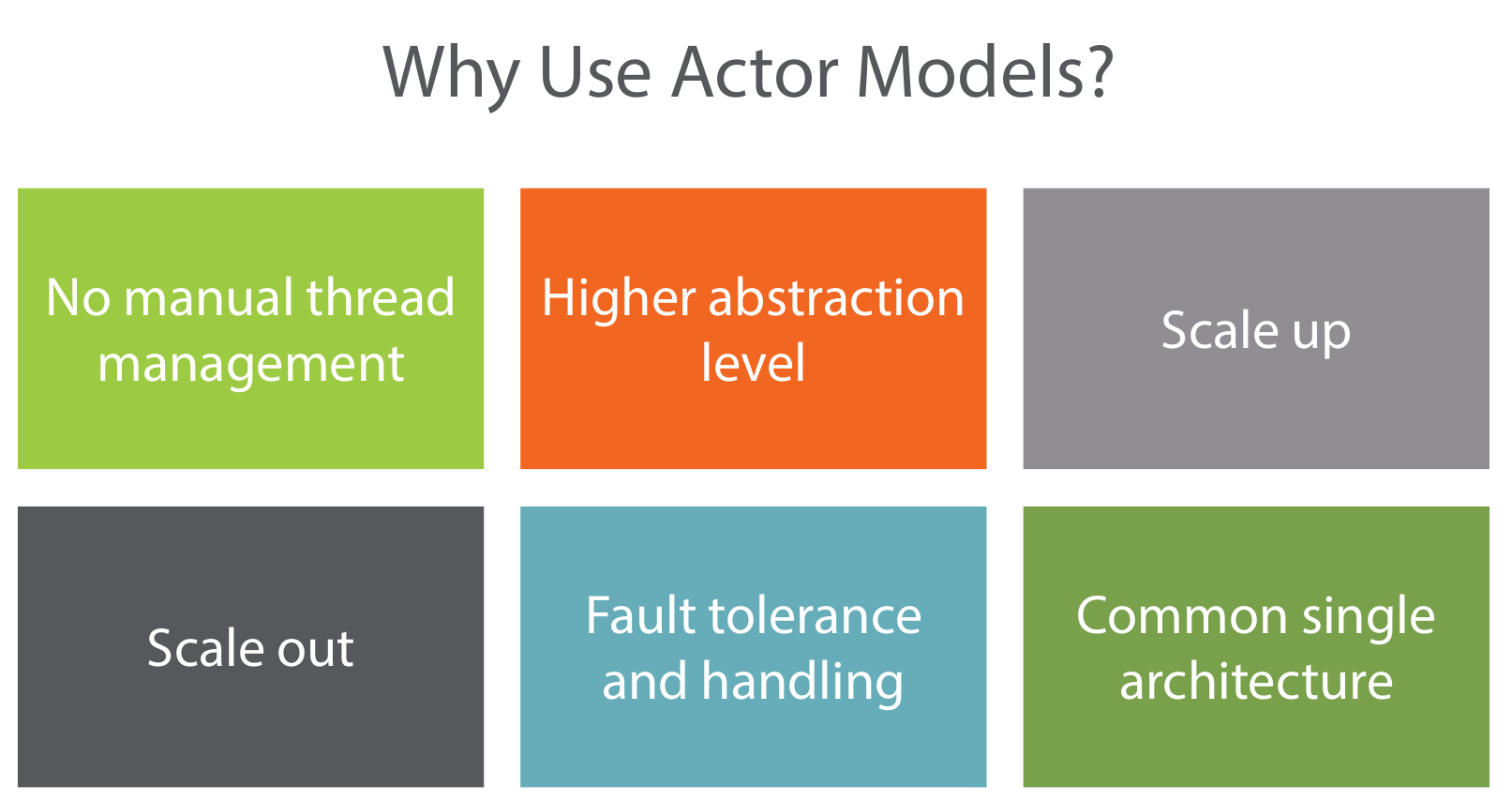
Why Use Actor Models
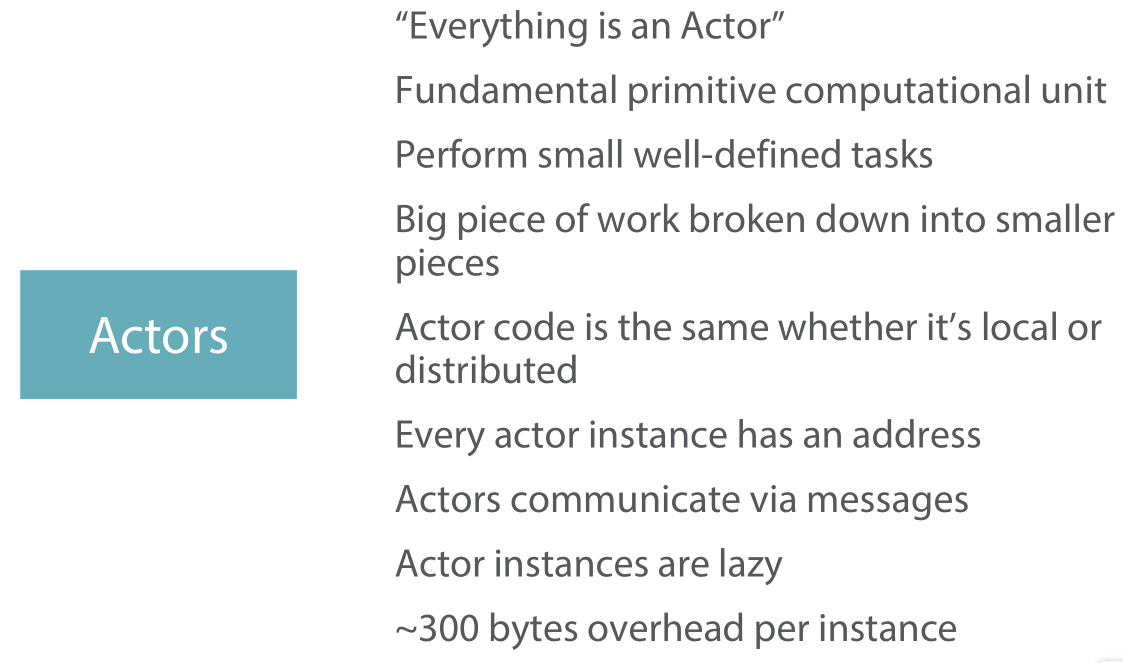
Actors 의 특징
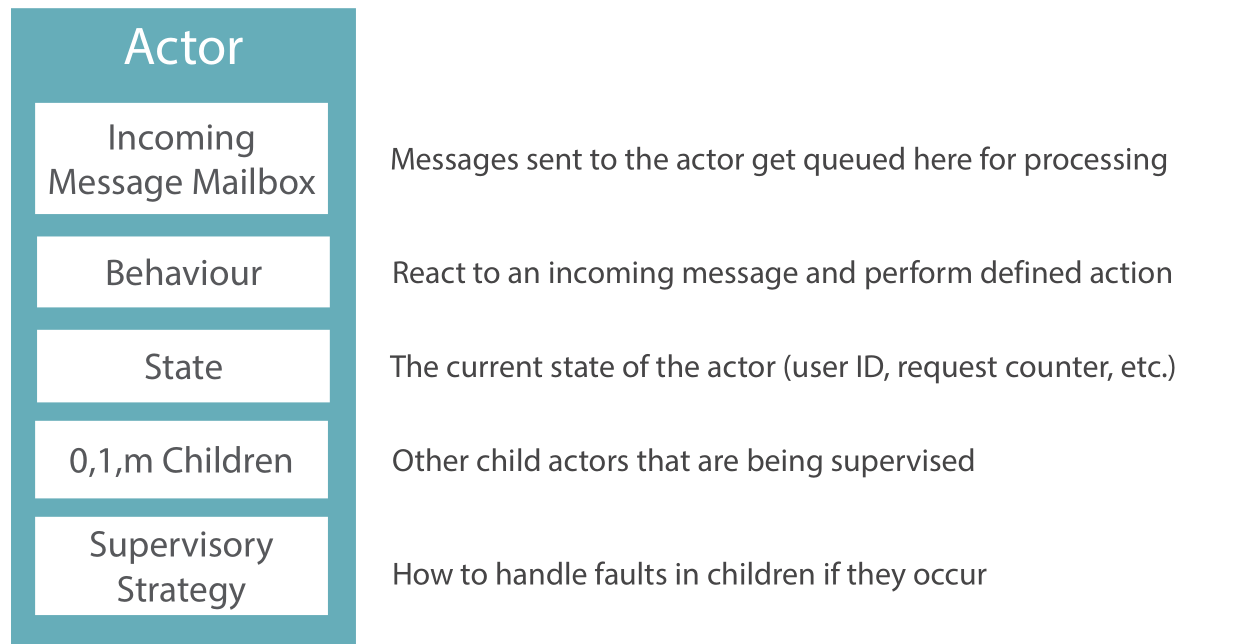
Message
- Simple POCO class
- Actors can change state when responding
- to messages
- Message instances should be immutable
- The passing of messages is asynchronous
Mesaage Class
public class Message
{
    public Message(int customerId)
    {
        CustomerId = customerId;
    }
    public int CustomerId { get; private set; }
    }
}
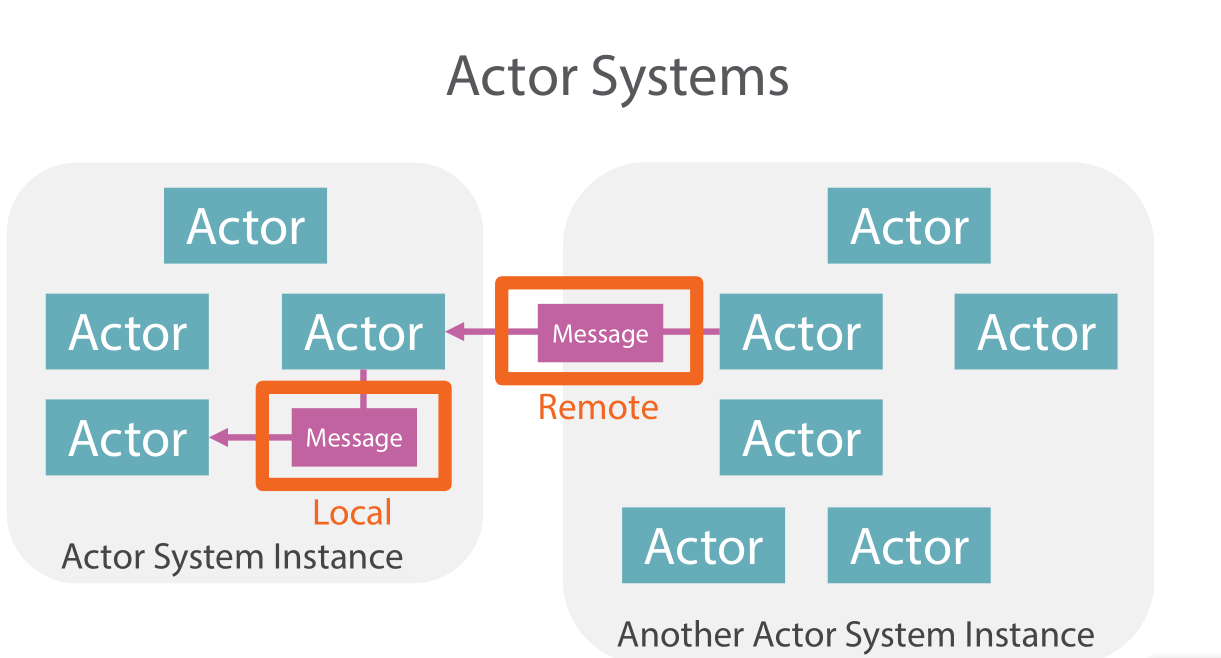
Actor System
Actor System은 Remove나 Local에 상관 없이 동작 한다.
Actor들은 Remove/Local에 대한 Dependency가 없다.(전혀 알지 못함)
Akka Nuget Packages
- Akka를 사용하기 위해서 필요한 패키지 종류들
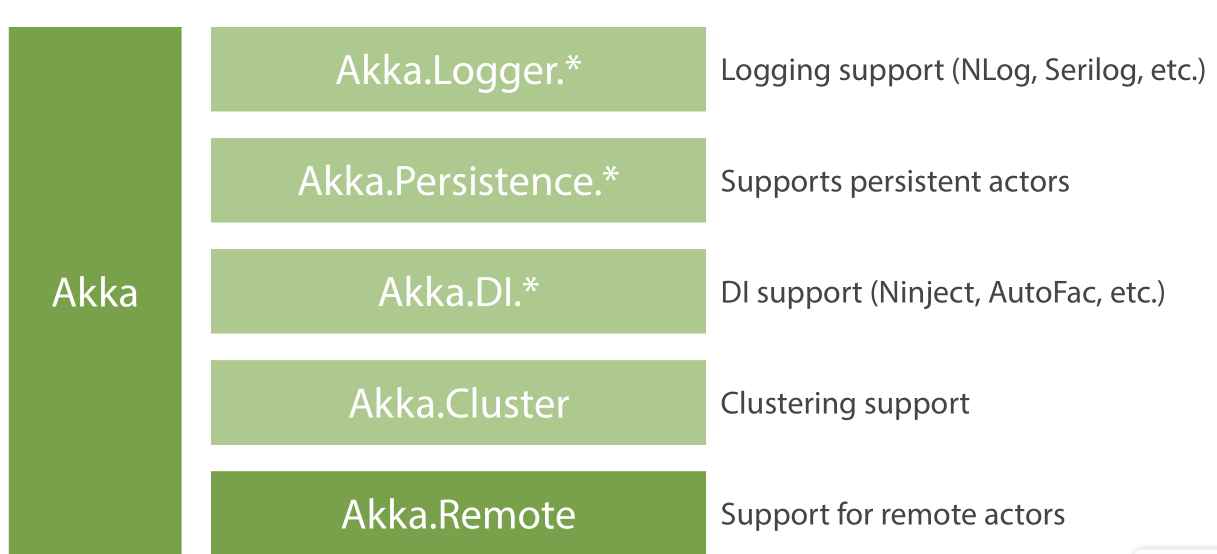
Actor System 생성 Code
    class Program
    {
        private static ActorSystem MovieStreamingActorSystem;

        static void Main(string[] args)
        {
            MovieStreamingActorSystem = ActorSystem.Create("MovieStreamingActorSystem");
            //Actor System Terminate
            MovieStreamingActorSystem.Shutdown();
        }
    }
Actor 사용방법 및 메세지
Actor 정의 및 올바른 사용
- Actor정의
- Class정의
- Akka.net Base Class를 상속
- Message Handling을 정의
Actor Refrence(참조)
- Actor의 참조를 얻는 방법
- Create New Actor
- ActorOf()
- Lookup existing Actor
- ActorSelection()
Message 정의 및 사용
- Message정의
- POCO클래스 생성
- Add Properties
- Setters private
- Message 종류
- Tell
- 다른 Actor에게 보냄
- 응답을 기대하지 않음(단방향)
- Fire And Forget
- Non-Block으로 동작
- 확장 및 동시성에서 좋음
- 가장 많이 사용
- Ask
- 다른 Actor에게 보냄
- 응답을 기대함
- 수신 Actor는 반드시 응답을 해야함
- 확장 및 동시성에 제한
- 필요 할때 조건부로 사용
- Forward
- Broad Casting에서 사용할 같음(예상)
- Tell
Actor 생성 및 Props
- Actor Instance(생성)
- Props 정의
- Instance name
- Props & name을 통해서 생성
- Props란?
- Actor를 생성 하기 위한 Recipe
- Actor System이 Actor를 생성하기 위한 정보 및 배포 관련 구성 정보가 들어 있음
Actor를 생성시 절대 New Keyword를 사용하지 않는다.
Factory methods를 통해서 Actor 및 Props를 생성
Send Simple & Custom Message
- UntypedActor VS RecivedActor
- RecivedActor는 처리할 수 있는 Message지정을 필터링 하는 방법이 매우 쉽다.
Actor 생성 및 Message 예제
//Program.cs
using System;
using Akka.Actor;
using MovieStreaming.Actors;

namespace MovieStreaming
{
    class Program
    {
        private static ActorSystem MovieStreamingActorSystem;

        static void Main(string[] args)
        {
            MovieStreamingActorSystem = ActorSystem.Create("MovieStreamingActorSystem");
            Console.WriteLine("Actor system created");

            Props playbackActorProps = Props.Create<PlaybackActor>();

            IActorRef playbackActorRef = MovieStreamingActorSystem.ActorOf(playbackActorProps, "PlaybackActor");

            //Send Message by Tell
            playbackActorRef.Tell(new PlayMovieMessage("Akka.NET: The Movie", 42));

            Console.ReadLine();

            MovieStreamingActorSystem.Shutdown();
        }
    }
}
Custom Message
public class PlayMovieMessage
{
    public string MovieTitle { get; private set; }
    public int UserId { get; private set; }

    public PlayMovieMessage(string movieTitle, int userId)
    {
        MovieTitle = movieTitle;
        UserId = userId;
    }
}
- UntypedActor 와 RecivedActor의 Message 처리 차이 예제
//Untype Actor
public class PlaybackActor : UntypedActor
{

    public PlaybackActor()
    {
        Console.WriteLine("Creating a PlaybackActor");
    }
    protected override void OnReceive(object message)
    {
        if (message is PlayMovieMessage)
        {
            var m = message as PlayMovieMessage;

            Console.WriteLine("Received movie title " + m.MovieTitle);
            Console.WriteLine("Received user Id " + m.UserId);
        }
        else
        {
            Unhandled(message);
        }
    }
}

// Recived Actor
public class PlaybackActor : ReceiveActor
{
    public PlaybackActor()
    {
        Console.WriteLine("Creating a PlaybackActor");

        Receive<PlayMovieMessage>(message => HandlePlayMovieMessage(message), message => message.UserId == 42);
    }

    private void HandlePlayMovieMessage(PlayMovieMessage message)
    {
        Console.WriteLine("Received movie title " + message.MovieTitle);
        Console.WriteLine("Received user Id " + message.UserId);
    }
}
Recived Actor의 Message Handling 코드가 훨신 가독성이 좋다.
Understanding Actor Lifecycles and States
Actor 생성 및 Life Cycle(수명주기)
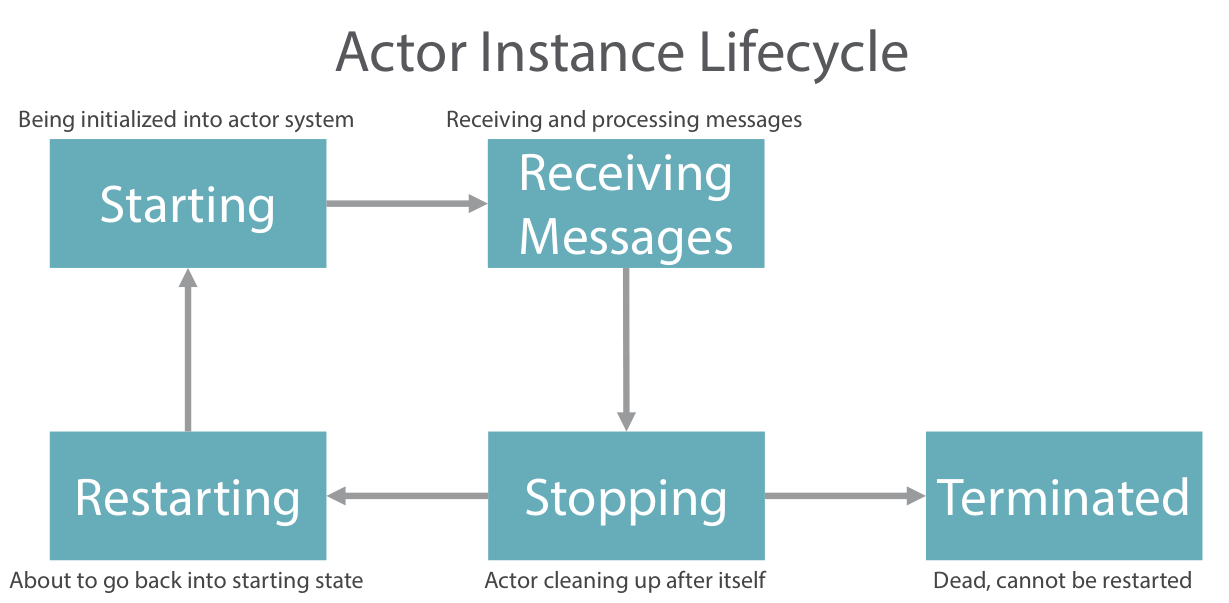
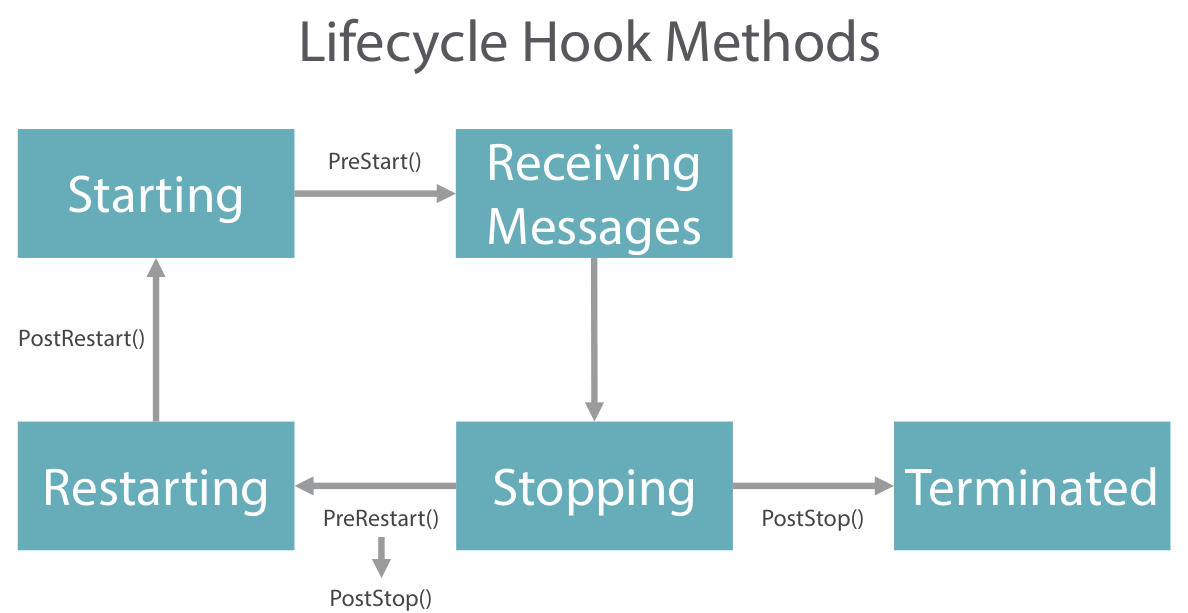
Lift-cycle hook methods
- PreStart()
- Actor가 첫번째 메세지를 받기 전에 호출
- 코드 초기화 및 메세지를 받기위한 사전 작업
- PostStop
- Actor가 Stop된후에 호출 , 더이상 어떤 메세지도 받지 않는 상태
- 코드 클린업 , 파일시스템등 리소스 해제
- PreRestart()
- Actor가 Restart되지 전에 호출 된다.
- 현재 메시지 혹은 Except
- PostRestart()
- PreRestart() 이후 , PreStart() 전에 호출
- 코드 예외처리
- Logging등 작업
Hook Method 예제
  public class PlaybackActor : ReceiveActor
  {
      public PlaybackActor()
      {
          Console.WriteLine("Creating a PlaybackActor");

          Receive<PlayMovieMessage>(message => HandlePlayMovieMessage(message));
      }

      private void HandlePlayMovieMessage(PlayMovieMessage message)
      {
          ColorConsole.WriteLineYellow(
              string.Format("PlayMovieMessage '{0}' for user {1}",
                            message.MovieTitle,
                            message.UserId));
      }

      protected override void PreStart()
      {
          ColorConsole.WriteLineGreen("PlaybackActor PreStart");
      }

      protected override void PostStop()
      {
          ColorConsole.WriteLineGreen("PlaybackActor PostStop");
      }

      protected override void PreRestart(Exception reason, object message)
      {
          ColorConsole.WriteLineGreen("PlaybackActor PreRestart because: " + reason);

          base.PreRestart(reason, message);
      }

      protected override void PostRestart(Exception reason)
      {
          ColorConsole.WriteLineGreen("PlaybackActor PostRestart because: " + reason);

          base.PostRestart(reason);
      }
  }
Terminating Actor hierarchies
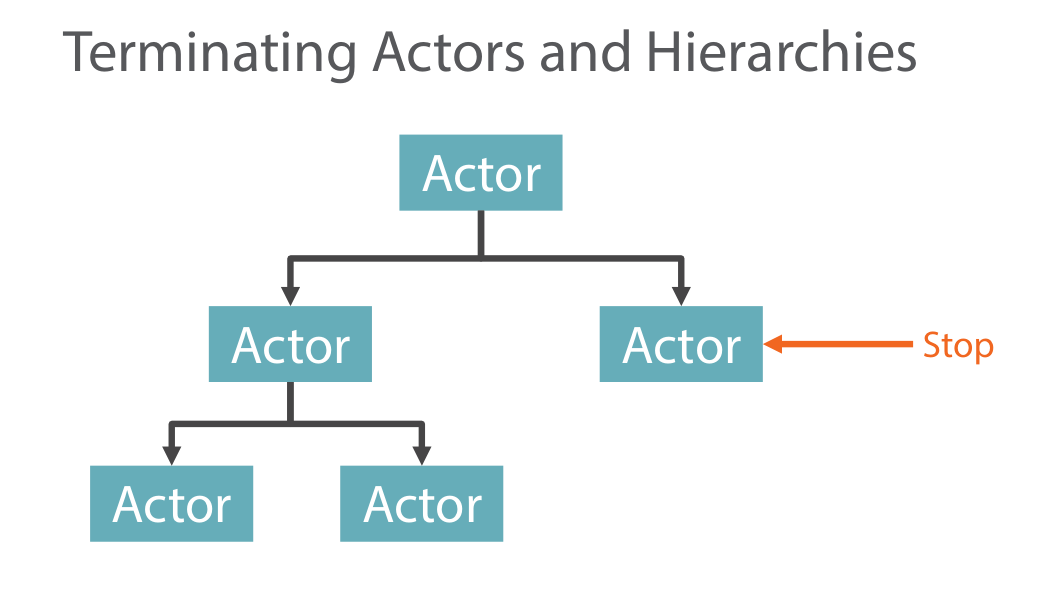
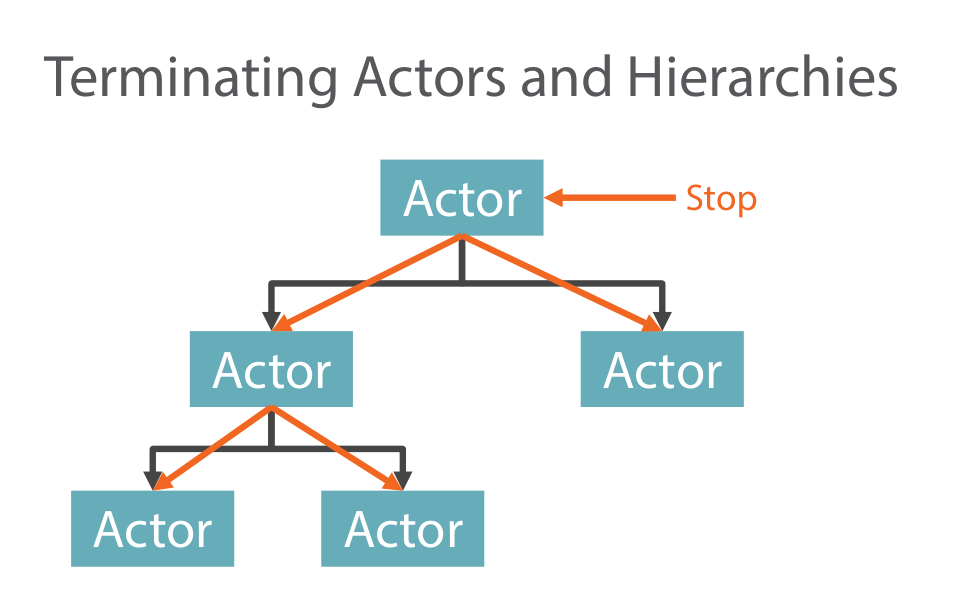
- 자식이 없는 경우
- 현재 메세지만 처리 후 , 남아 있는 메세지는 처리 하지 않는다.
- MessageBox의 남은 메세지는 DeadLetter라는 특수한 장로로 옮겨진다.
- PostStop() Method를 호출
- 자식이 있는 경우
- 자식에게 Stop 명령을 전달
- 자식이 모두 Stop후 부모가 Stop
- Actor를 Stop시키는 여러가지 방법
- ActorSystem.Shutdown();
- 부모가 Exception이 발생한 경우 자식이 자동 종료
- 부모의 코드에서 수동으로 호출 Context.Stop(someChildActorRef);
- Actor에 PoisonPill Message를 보냄
- 기본적으로 종료는 Asynchronously(비동기적) 으로 함
- someActorRef.GracefulStop(TimeSpan.FromMinutes(1));으로 동기 처리 가능
PoisonPill 메세지 보내기
someActorRef.Tell(PoisonPill.Instace); //종료 메세지 Send
- 종료는 비동기로 처리
- MailBox에 Message로 등록되며, 이전 메세지를 모두 처리한 후 동작
Switchable Actor behaviours
behaviours를 바꾸는 2가지 방법
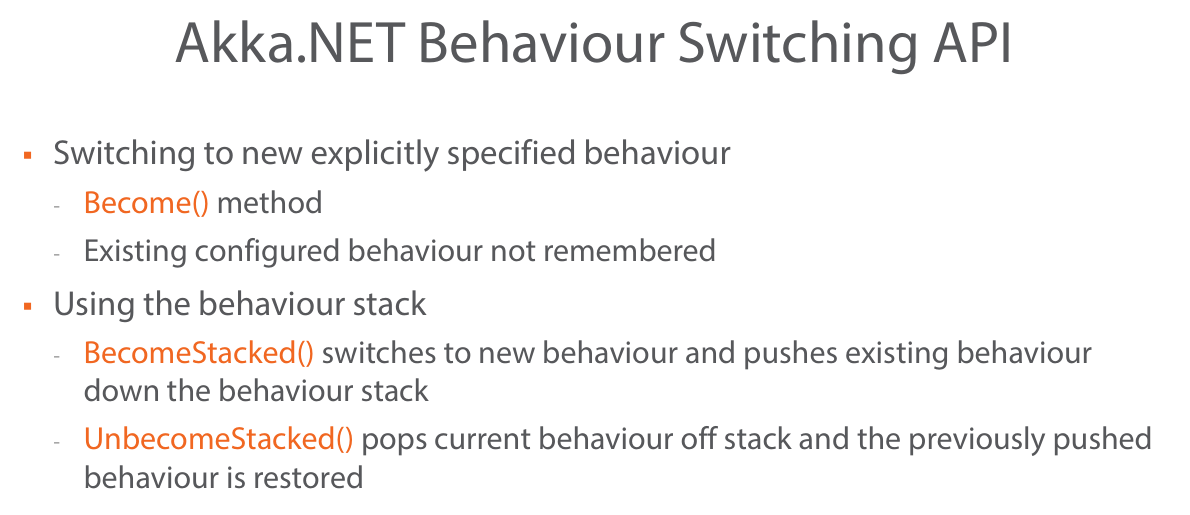
- Swichable behavior은 Actor의 재사용성 및 적은 코드를 실용적으로 사용 할 수 있다고 함
- 이것은 현재 Actor의 상태에 따라서 SomeMessage를 다르게 처리 할 수 있는 방법 이다.
아래의 예제를 보면 좀 더 이해하기 쉬울 것이다.
Switchable Actor behaviours 예제
Playing | Stopped의 상태에 따라서 같은 Message를 다르게 처리 하도록 등록 할 수 있다.
public class UserActor : ReceiveActor
{
    private string _currentlyWatching;

    public UserActor()
    {
        Console.WriteLine("Creating a UserActor");

        ColorConsole.WriteLineCyan("Setting initial behaviour to stopped");
        Stopped();
    }

    private void Playing()
    {
        Receive<PlayMovieMessage>(
            message => ColorConsole.WriteLineRed(
                "Error: cannot start playing another movie before stopping existing one"));
        Receive<StopMovieMessage>(message => StopPlayingCurrentMovie());

        ColorConsole.WriteLineCyan("UserActor has now become Playing");
    }

    private void Stopped()
    {
        Receive<PlayMovieMessage>(message => StartPlayingMovie(message.MovieTitle));
        Receive<StopMovieMessage>(
            message => ColorConsole.WriteLineRed("Error: cannot stop if nothing is playing"));

        ColorConsole.WriteLineCyan("UserActor has now become Stopped");
    }


    private void StartPlayingMovie(string title)
    {
        _currentlyWatching = title;

        ColorConsole.WriteLineYellow(string.Format("User is currently watching '{0}'", _currentlyWatching));

        Become(Playing);
    }


    private void StopPlayingCurrentMovie()
    {
        ColorConsole.WriteLineYellow(string.Format("User has stopped watching '{0}'", _currentlyWatching));

        _currentlyWatching = null;

        Become(Stopped);
    }
}
Actor 계층 생성 및 결함 분리
Actor 관리 감독 계층 구조
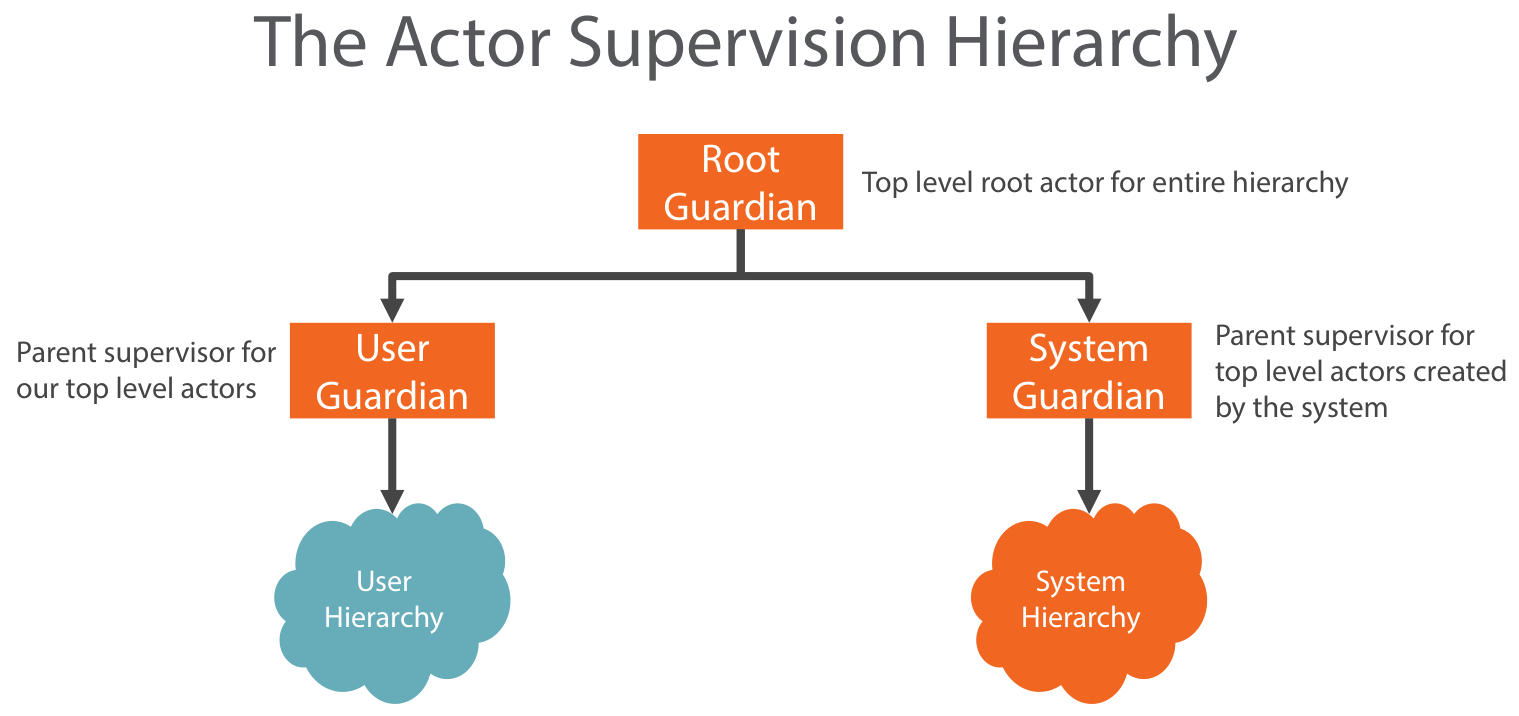
- 기본적으로 Guardian은 상위 계층에 오류를 넘기지 않고 처리하도록 설계한다.
- 만약 최상위 Guardian까지 전파 된다면 ActorSystem 전체가 종료 된다.
- 기본적으로 ActorSystem을 생성하면 위와 같은 계층에 Guardian이 자동으로 만들어 지게 됨.
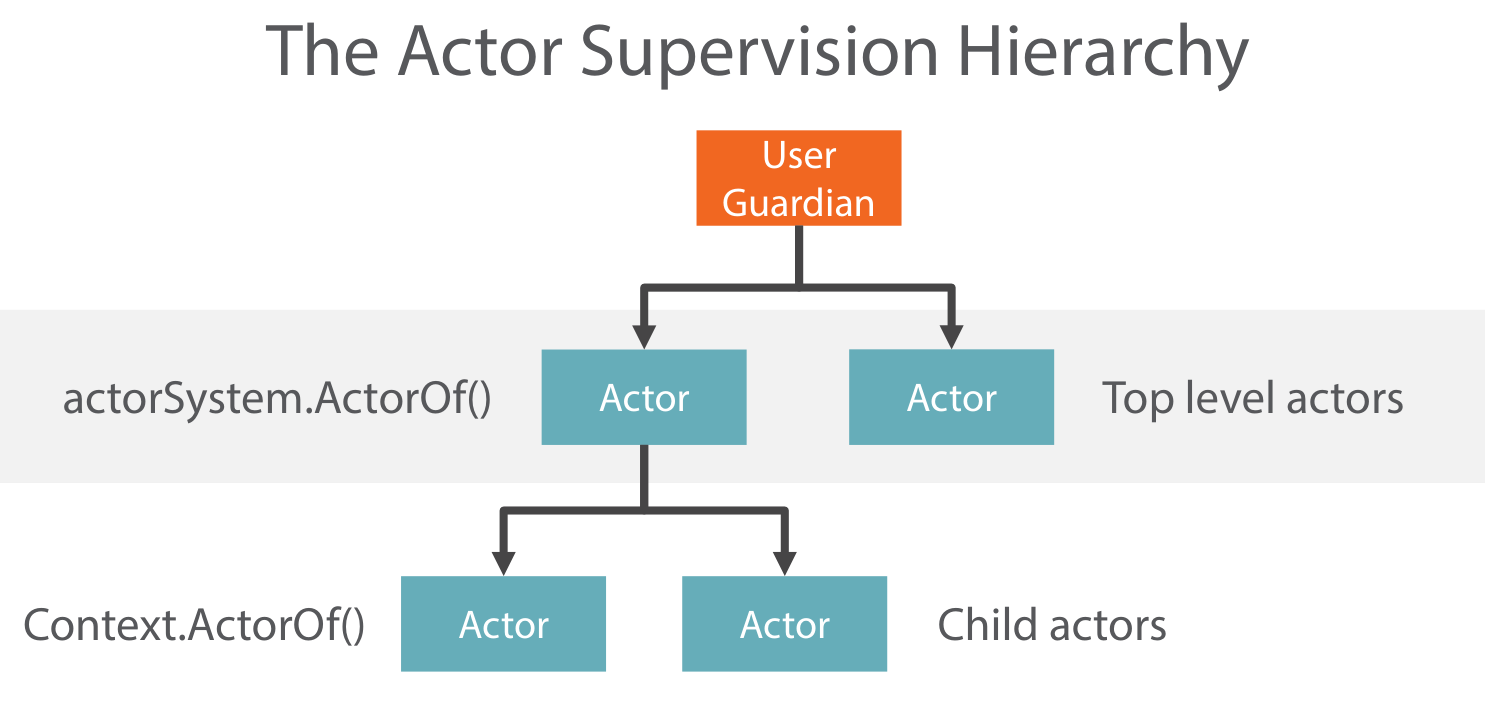
- Top Level의 Actor는 actorSystem.ActorOf() 를 통해서 만들어 짐.
- Top Level의 하위 Actor는 Actor Code 안에서 Context.ActorOf() 를 통해서 만들어 짐
Actor Path
- Actor가 다른 Actor에게 Message를 보내는데 아래와 같이 계층 구조에 속하지 않은 Actor에게 어떻게 Message를 보낼 수 있을까?
- ActorSystem에는 Path개념이 있어서 다른 Actor에 접금이 가능 하다.
- 우리가 URL에 접근하는 것과 같은 이치 이다.
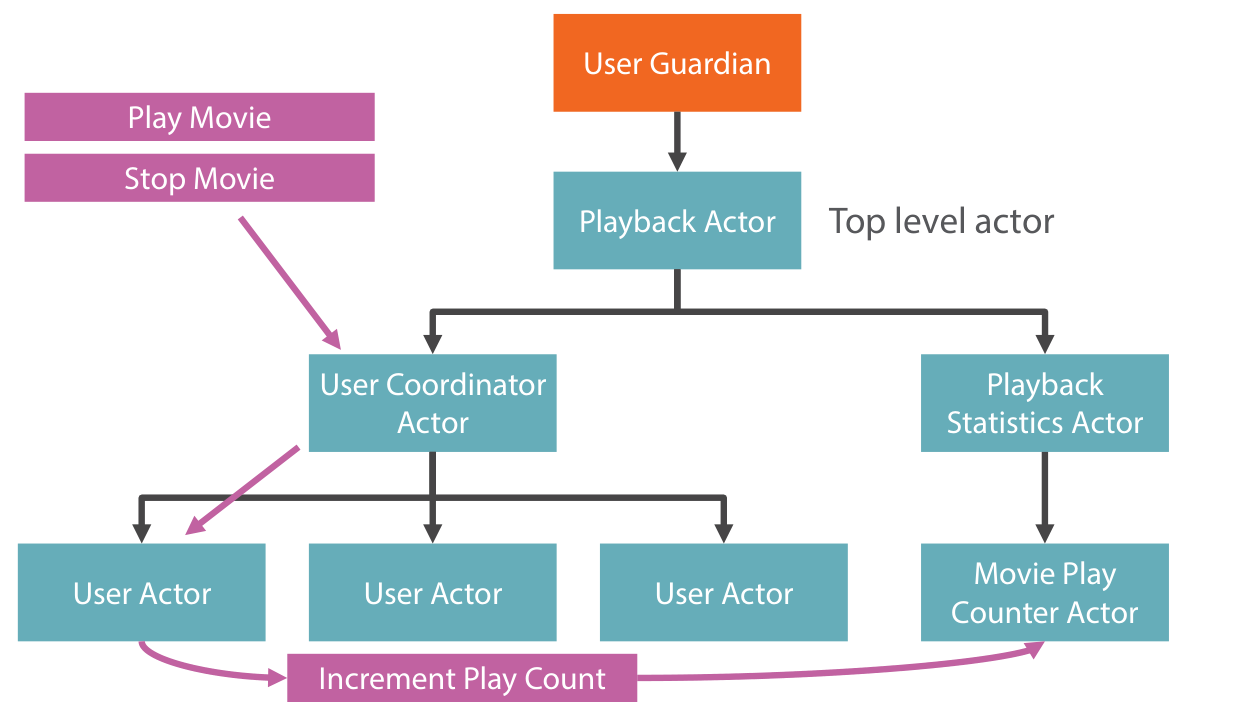
아래와 같이 Local , Remote 상관 없이 Actor에게 Message를 보낼 수 있다.
Actor System에 Path syntex는 다음과 같다.
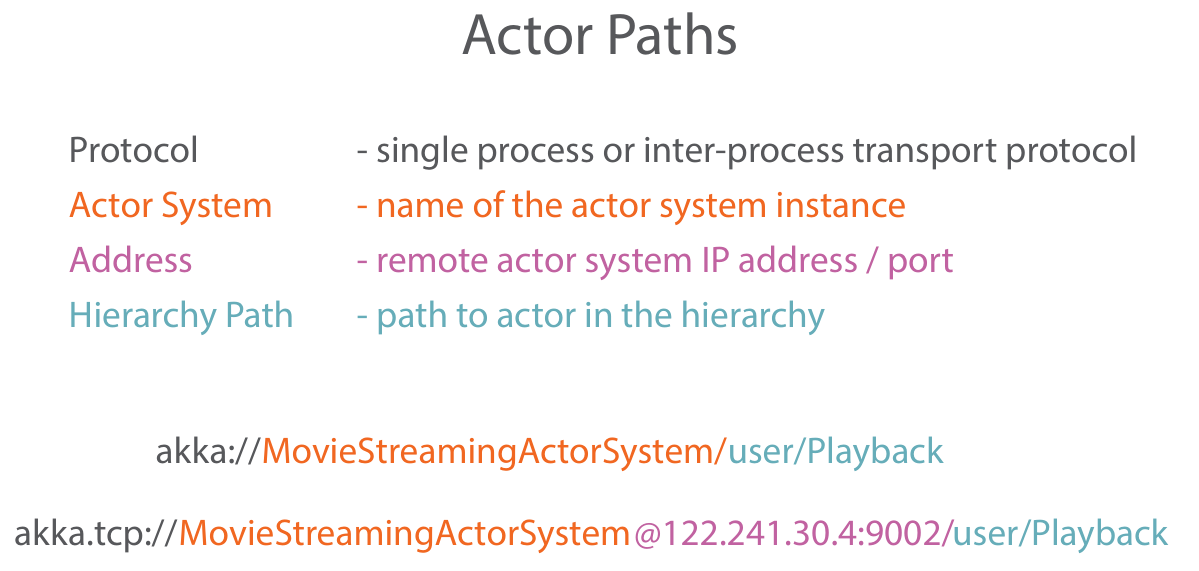
Actor Selection
Actor Selectio 예제
var message = new PlayMovieMessage(movieTitle, userId);
MovieStreamingActorSystem
.ActorSelection("akka://MovieStreamingActorSystem/user/Playback/UserCoordinator")
.Tell(message);
동일 ActorSystem에 있는 경우는 아래와 같이 생략된 상대경로를 통해서 사용 가능
var message = new PlayMovieMessage(movieTitle, userId);
MovieStreamingActorSystem
.ActorSelection("/user/Playback/UserCoordinator")
.Tell(message);
Actor Child hierarchy구성 예제
public class PlaybackStatisticsActor : ReceiveActor
{
    public PlaybackStatisticsActor()
    {
        Context.ActorOf(Props.Create<MoviePlayCounterActor>(), "MoviePlayCounter");
    }
}
부모의 감독 관리
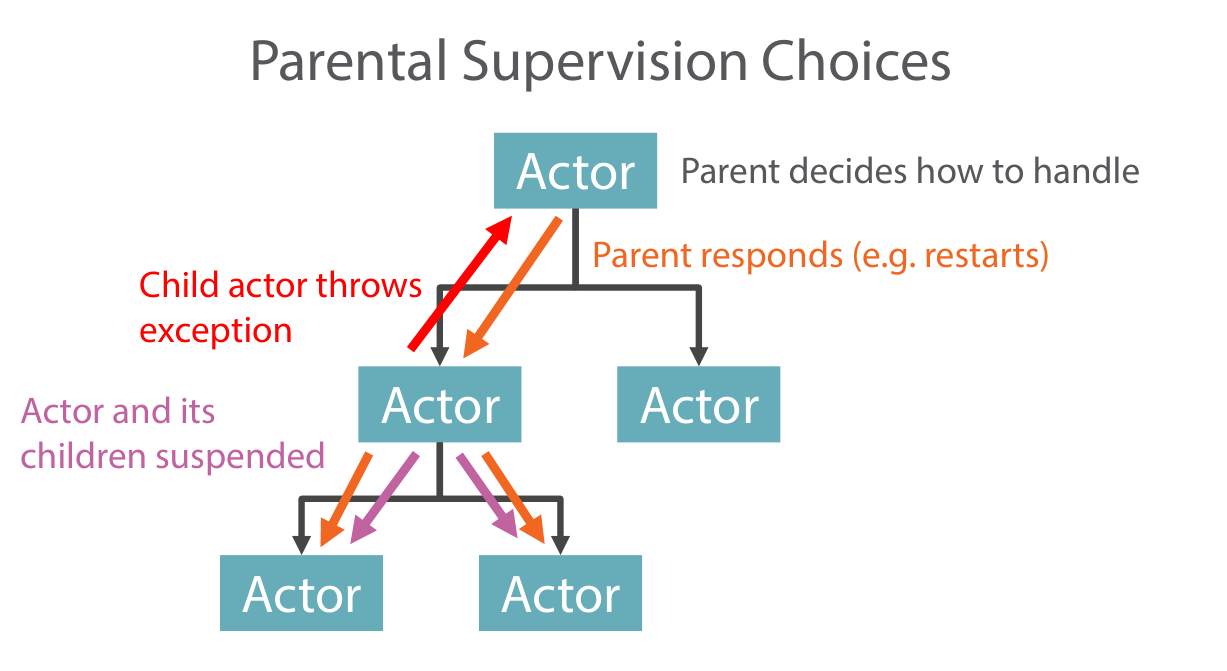
- Actor Exception이 발생한 경우
- Exception이 발생한 Actor 의 Child Actors은 모두 동작을 멈춘다.
- 부모 Actor에게 Exception을 통지 한다.
- 부모 Actor가 Exception Handle 방법을 Child Actor에게 통지 한다.
- Exception이 발생한 Actor가 Child Actor들에게 부모로 부터 통지 받은 Handle방법을 전파 한다.
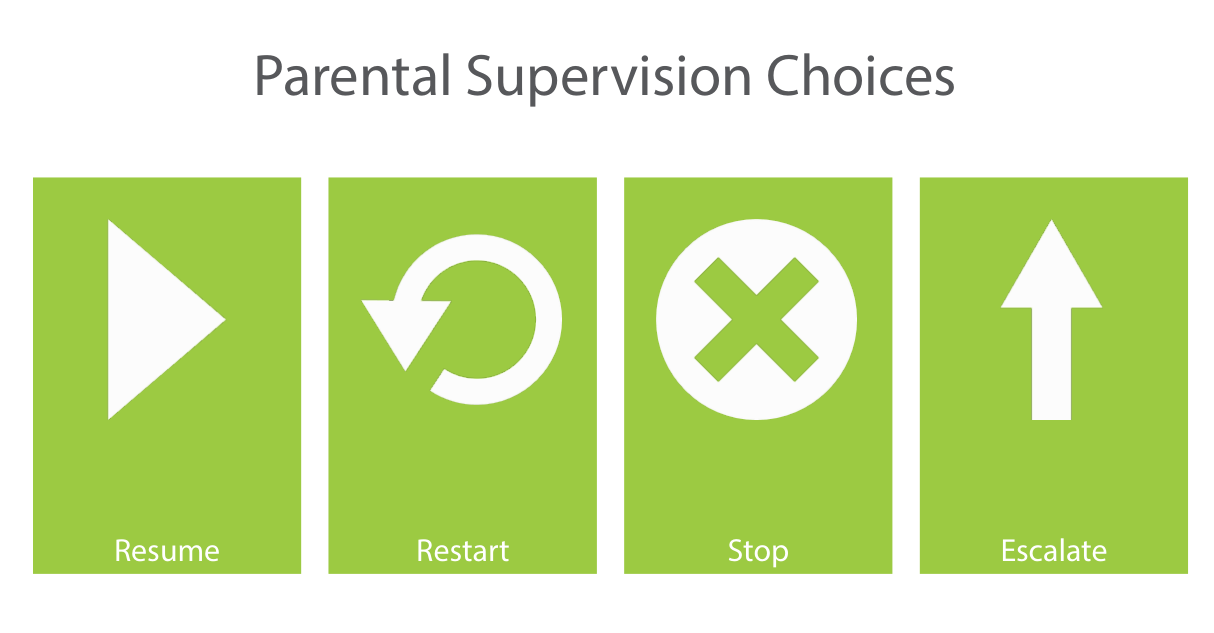
- Exception Handle 종류
- Resume
- 기본적으로 Exception 무시
- 자식 Actor의 상태는 보존
- 자식 Actor의 자식들 또한 Resume 된다
- Restart
- 자식 Actor 재시작
- 자식 Actor는 상태를 잃는다.
- 자식 Actor의 자식들 또한 Restart됨(Default)
- Actor의 MailBox Message들은 보존 되며, 재시작후 보존된 Message들을 처리 한다.
- Stop
- 자식 Actor는 영원히 종료됨
- 자식 Actor의 자식들 또한 종료
- Escalate
- 부모의 부모 Actor에게 Exception이 전파
- 부모 Actor또한 동작이 정지 됨
- 다른 부모의 자식 Actor들 또한 정지 됨
- Resume
Supervision Strategies (감독 전략)
Default Strategy
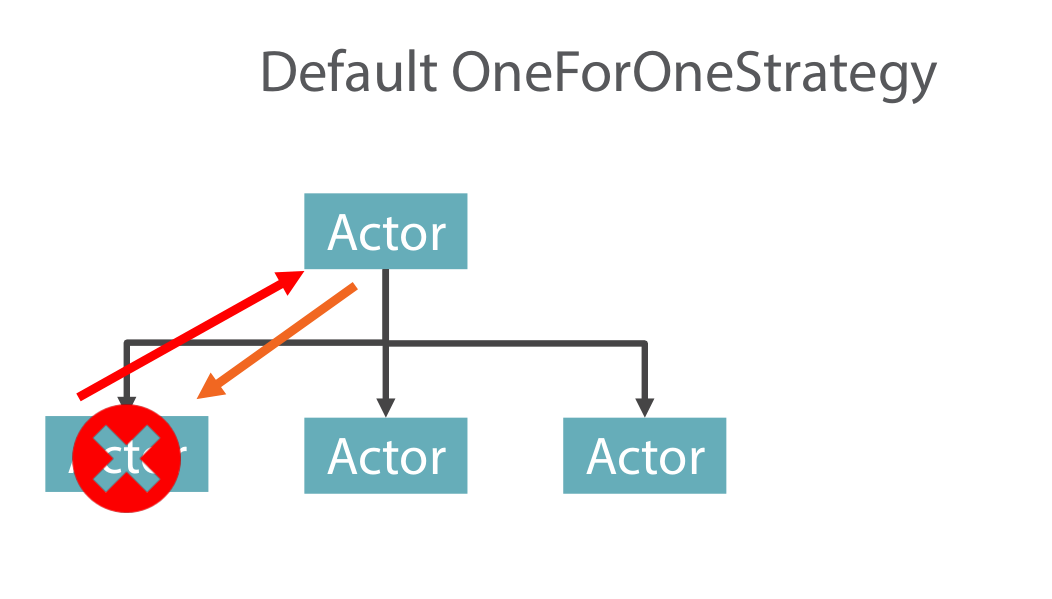
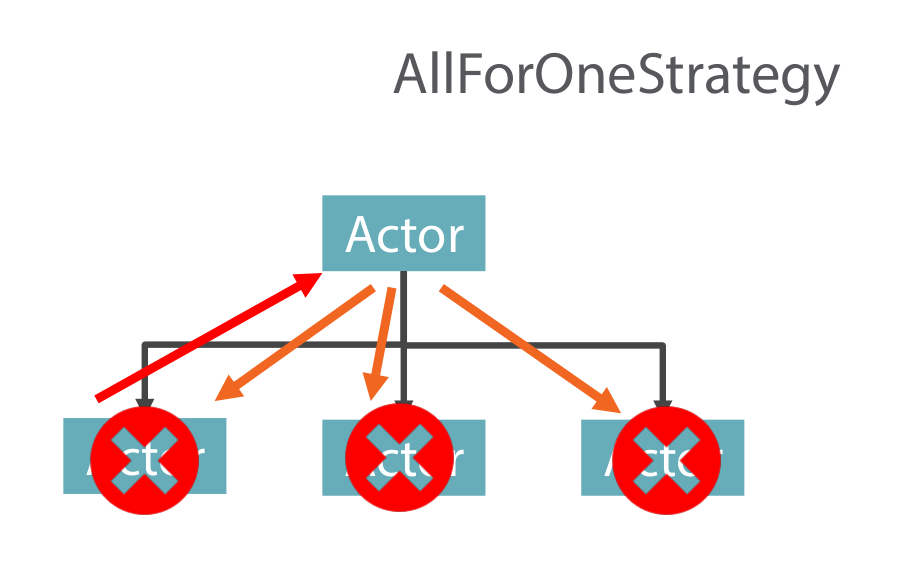
- OneForOne-Stratege
- 예외가 발생한 Child Actor에게만 예외처리 명령을 통지 한다.
- AllForOne-Stratege
- 예외가 발생한 동일 레벨의 Child Actors 모두에게 예외처리 명령을 통지 한다.
- 기본적으로 Actor의 Supervision Strategies는 아래와 같다.
- OneForOne-Strategy
- Restart
Default Code
//Actor Override
protected override SupervisorStrategy SupervisorStrategy()
{
    return base.SupervisorStrategy();
}

//base.SupervisorStrategy();
protected virtual Akka.Actor.SupervisorStrategy SupervisorStrategy() =>
                                                                    Akka.Actor.SupervisorStrategy.DefaultStrategy;

public static readonly SupervisorStrategy DefaultStrategy =
(SupervisorStrategy) new OneForOneStrategy(new Func<Exception, Directive>(SupervisorStrategy.DefaultDecider));

//SupervisorStrategy.DefaultDecider
    public static Directive DefaultDecider(Exception exception)
    {
      switch (exception)
      {
        case ActorInitializationException _:
          return Directive.Stop;
        case ActorKilledException _:
          return Directive.Stop;
        case DeathPactException _:
          return Directive.Stop;
        default:
          return Directive.Restart;
      }
    }
Custom Strategy
- Actor의 Supervisor동작을 정의 하려면, Actor에서 SupervisorStrategy()를 Override 해야 함
Custom Strategy 예제
public class Supervisor : UntypedActor
{
    protected override SupervisorStrategy SupervisorStrategy()
    {
        return new OneForOneStrategy(
            maxNrOfRetries: 10,
            withinTimeRange: TimeSpan.FromMinutes(1),
            localOnlyDecider: ex =>
            {
                switch (ex)
                {
                    case ArithmeticException ae:
                        return Directive.Resume;
                    case NullReferenceException nre:
                        return Directive.Restart;
                    case ArgumentException are:
                        return Directive.Stop;
                    default:
                        return Directive.Escalate;
                }
            });
    }

    protected override void OnReceive(object message)
    {
        if (message is Props p)
        {
            var child = Context.ActorOf(p); // create child
            Sender.Tell(child); // send back reference to child actor
        }
    }
}
Deploying and Messaging Remote Actors
Configuration Akka.net
- Akka Remote는 HOCON이라는 문법으로 구성 된다.
- C# Project의 App.config에 다음과 같이 구성이 된다.
<!-- Clinet Config -->
<?xml version="1.0" encoding="utf-8" ?>
<configuration>

  <configSections>
    <section name="akka"
             type="Akka.Configuration.Hocon.AkkaConfigurationSection, Akka" />
  </configSections>

  <akka>
    <hocon>
      <![CDATA[

        akka {
          loglevel = OFF

          actor {
            provider = "Akka.Remote.RemoteActorRefProvider, Akka.Remote"
            debug {
              receive = on
              autoreceive = on
              lifecycle = on
              event-stream = on
              unhandled = on
            }
          }

          remote {
            helios.tcp {
  	          transport-class = "Akka.Remote.Transport.Helios.HeliosTcpTransport, Akka.Remote"
  	          transport-protocol = tcp
  	          port = 0
  	          hostname = "127.0.0.1"
            }
          }
        }

      ]]>
    </hocon>
  </akka>

  <startup>
    <supportedRuntime version="v4.0" sku=".NETFramework,Version=v4.5.1" />
  </startup>
</configuration>


<!-- Remote Config -->
<?xml version="1.0" encoding="utf-8" ?>
<configuration>
  <configSections>
    <section name="akka"
             type="Akka.Configuration.Hocon.AkkaConfigurationSection, Akka" />
  </configSections>
  <akka>
    <hocon>
      <![CDATA[

        akka {
          loglevel = OFF

          actor {
            provider = "Akka.Remote.RemoteActorRefProvider, Akka.Remote"
            debug {
              receive = on
              autoreceive = on
              lifecycle = on
              event-stream = on
              unhandled = on
            }
          }

          remote {
            helios.tcp {
  	          transport-class = "Akka.Remote.Transport.Helios.HeliosTcpTransport, Akka.Remote"
  	          transport-protocol = tcp
  	          port = 8091
  	          hostname = "127.0.0.1"
            }
          }
        }

      ]]>
    </hocon>
  </akka>
      <startup>
        <supportedRuntime version="v4.0" sku=".NETFramework,Version=v4.5.1" />
    </startup>
</configuration>
댓글남기기